
Check usage and billing
PlansPro
Published:2026-08-07 16:20/Updated:2026-08-07 16:26
Review your organization usage and estimated cost, switch periods, read the usage records and download CSV.
The billing screen shows your organization's usage and estimated cost.
How to view it
-
Click [Billing] at the top right of organization settings.
-
Choose a period in the selector at the top; the matching charge is shown.
- When a rate is configured: the current charge per unit is displayed
- When no rate is configured: it says the rate is not set
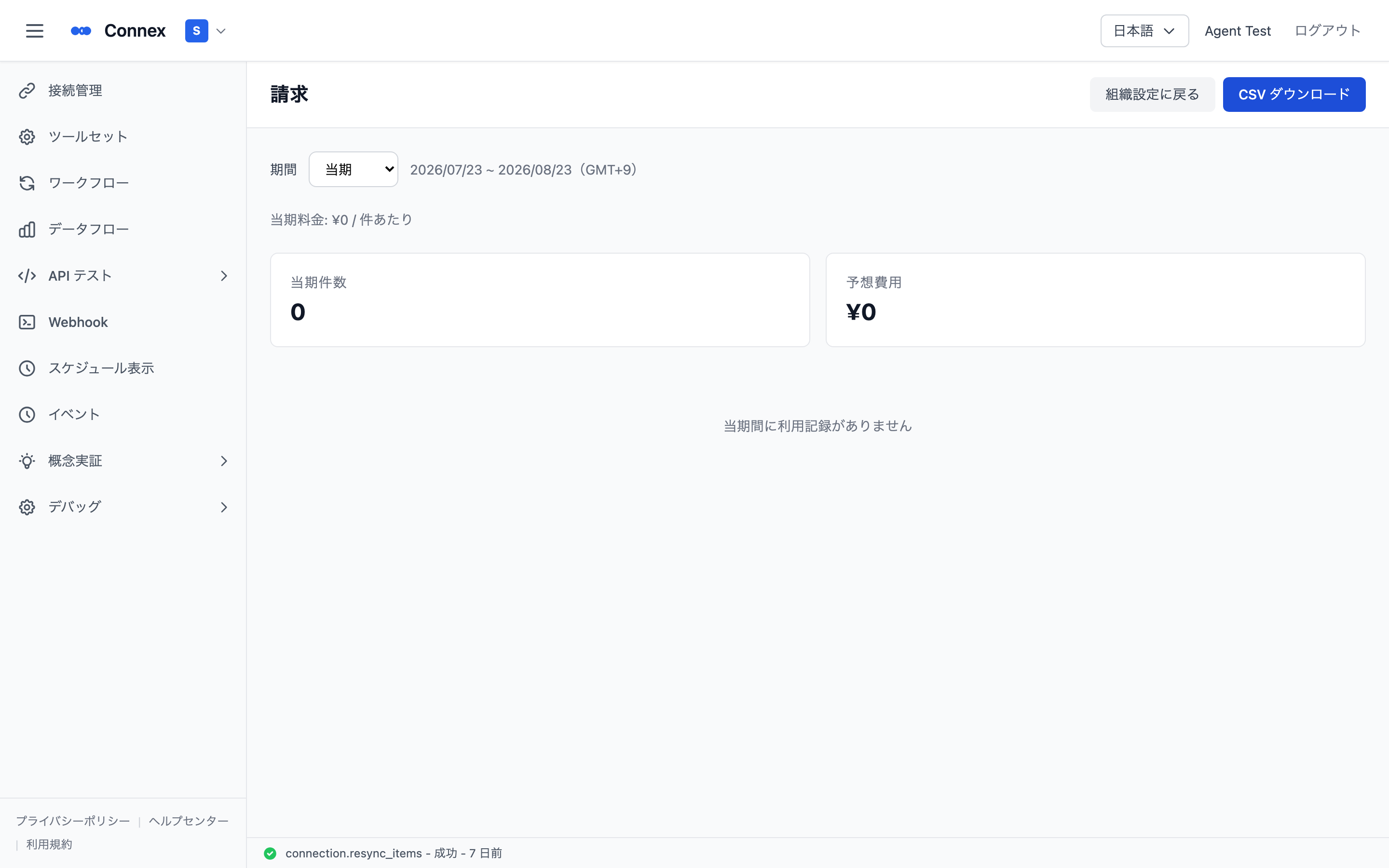
Summary cards
| Item | Meaning |
|---|---|
| Usage this period | Total units used in the selected period |
| Estimated cost | Calculated from the usage count and the rate |
The usage table
Individual records are listed (columns: time / metric / count / source).
- Metric is the kind of feature used (e.g. B2 Cloud API calls)
- The source link opens the operation that produced the record (an export log, for example)
- When there are many records, use [Load more] to continue loading
- A message is shown when there is no usage in the period
Click [Download CSV] to export the usage records for the selected period.
Note
- Billing is available on the Connex Pro plan only. The Billing entry is not shown on the basic plan.
- Rates are managed by Connex, so organization owners cannot change them from this screen.
Was this article helpful?